hub-dashboard-extension
 Hub Extension
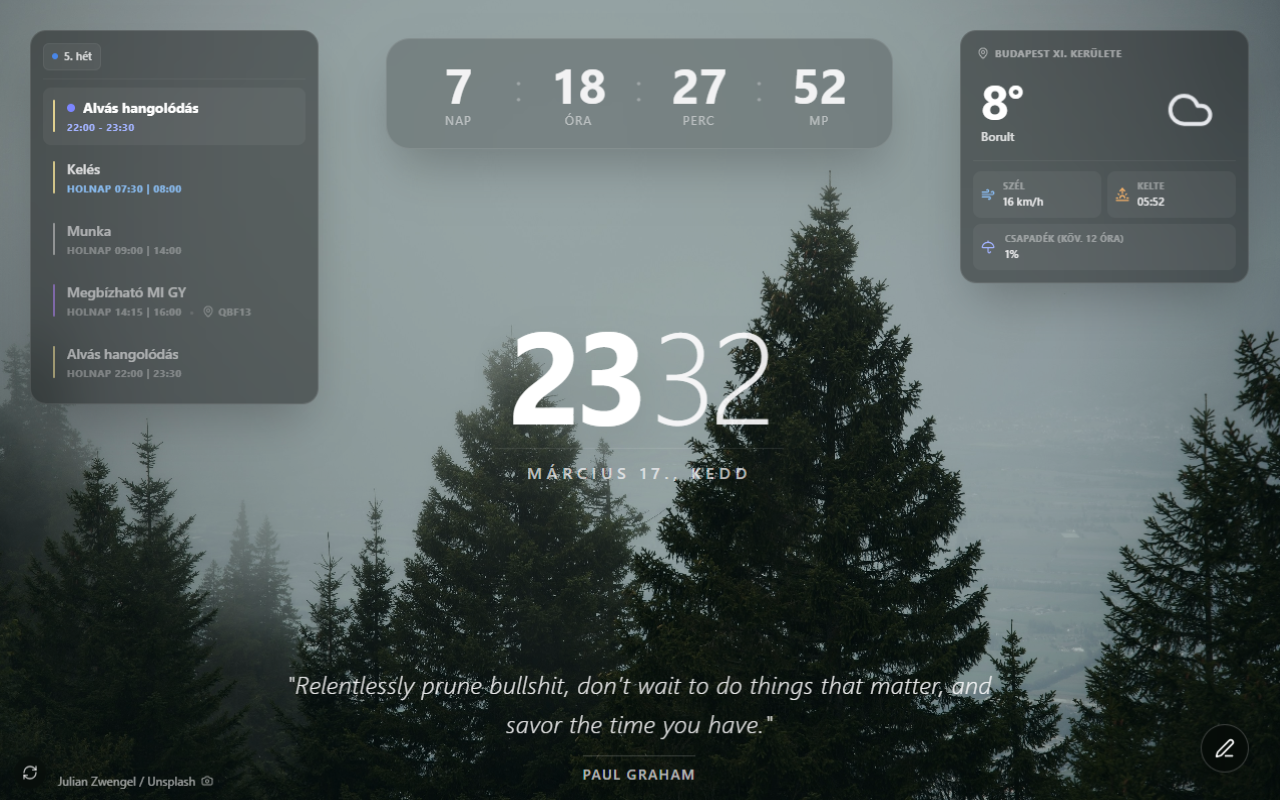
A Chrome extension that replaces the new tab page with a minimalist dashboard. Shows time, weather, upcoming Google Calendar events, a daily Stoic quote, a countdown timer, and a quick note — all over a full-screen Unsplash background.
Features
- Clock — current time and date with a time-of-day greeting
- Weather — temperature, wind, rain probability, sunrise/sunset, and a four-day forecast via Open-Meteo
- Calendar — next upcoming Google Calendar events (read-only OAuth)
- Quote — daily Stoic quote, proxied and cached by the Hub API, with a bundled offline fallback
- Countdown — custom target date configurable from settings
- Focus timer — Pomodoro-style work/break timer owned by the service worker, so it keeps running with no tab open and raises exactly one notification per phase change
- Quick note — per-day scratchpad, stored locally
- Background — a random Unsplash photo fetched from the Hub API and cached daily, or a custom image of your own; dimmable, with tomorrow’s photo prefetched ahead of time
Press . anywhere to toggle the UI overlay on/off, or double-click. Escape always brings it back.
Preview
Local development
1. Install dependencies
From the monorepo root:
pnpm install
2. Configure environment variables
Create apps/extension/.env:
VITE_DEV_CLIENT_ID=your_google_oauth_client_id
- Google OAuth client ID: console.cloud.google.com → create an OAuth 2.0 Client ID for a Chrome Extension
3. Start the dev server
cd apps/extension
pnpm dev
# Dev server at http://localhost:5173
Note: The Vite dev server is useful for iterating on UI. To test as an actual new tab override, load the built extension in Chrome (see below).
4. Load in Chrome as an unpacked extension
pnpm build # Outputs to dist/
- Open
chrome://extensions - Enable Developer mode (top right)
- Click Load unpacked
- Select the
apps/extension/dist/folder - Open a new tab
After code changes, run pnpm build again and click the refresh icon on the extension card in chrome://extensions.
Scripts
| Command | Description |
|---|---|
pnpm dev |
Start Vite dev server at http://localhost:5173 |
pnpm build |
Type-check + production build → dist/ |
pnpm pack |
Build and zip dist/ → extension-release.zip |
pnpm lint |
Run ESLint |
pnpm test |
Run Vitest once |
pnpm test:watch |
Run Vitest in watch mode |
pnpm check |
Type-check + lint + test |
Tests
Vitest with happy-dom. src/test/ provides stubs for the chrome APIs and the
Cache API; setup.ts reinstalls them and calls vi.resetModules() before every
test, so hooks that read module-level state (useSettings) must be imported
inside the test with await import(...) rather than at the top of the file.
Covered: the settings store; background fetching, caching and prefetch; the image cache, including the custom-image path; daily cache expiry; calendar event categorisation; four-day forecast summarisation and precipitation aggregation; changelog parsing; the “what’s new” banner; widget visibility; background dimming; the quote fallback; the document-title hook; and the service worker itself — alarm scheduling, install-time cache cleanup, and the Pomodoro timer’s start/reset/advance/rehydrate state machine under concurrent and cross-restart scenarios, including notification-locale parity across every shipped locale. A couple of popup-form rendering edge cases are covered directly; the rest of rendering is still verified by hand in Chrome.
Deployment
The extension deploys to the Chrome Web Store via GitHub Actions on every extension@* tag push.
Automated deployment (GitHub Actions)
- Add these secrets to your GitHub repository:
EXTENSION_ID— Chrome Web Store extension ID (from the store URL)CLIENT_ID— Google OAuth client ID (for Web Store API)CLIENT_SECRET— Google OAuth client secretREFRESH_TOKEN— Google OAuth refresh token
- Push a version tag:
git tag extension@2.0.1
git push origin extension@2.0.1
GitHub Actions runs .github/workflows/deploy.yml, which builds with pnpm nx run extension:pack (produces extension-release.zip) and uploads to the Chrome Web Store.
Manual submission
pnpm pack
# Creates extension-release.zip from dist/
Upload extension-release.zip manually at chrome.google.com/webstore/devconsole.
Settings
Click the extension icon to open the settings popup:
| Setting | Description |
|---|---|
| Language | UI language, or auto-detect from the browser |
| Background source | Unsplash photos, or a custom uploaded image |
| Background tags | Comma-separated Unsplash search tags (Unsplash source only) |
| Background dimming | Darkens the photo behind the UI, 0-70% |
| Location | City name or auto-detect via GPS or IP |
| Countdown target | Date to count down to |
| Focus / break length | Minutes for each Pomodoro work phase and each break |
| Calendars | Select which Google Calendars to display |
| Visible widgets | Show or hide each widget independently |
Settings sync across devices via Chrome Storage Sync.
Permissions
| Permission | Reason |
|---|---|
storage |
Persist settings via Chrome Storage Sync, plus local caches and Pomodoro state via chrome.storage.local |
geolocation |
Auto-detect location for weather |
identity |
Google Calendar OAuth login |
alarms |
Schedule the daily background prefetch and the Pomodoro phase timer, both owned by the service worker |
notifications |
Show the one system notification when a focus or break phase ends |
OAuth scope: https://www.googleapis.com/auth/calendar.readonly — read-only, and
covers both the calendar list (for the picker and calendar colours) and events.
Every host the extension calls must also appear in host_permissions in
manifest.json, and any change to permissions, scopes or hosts
must be mirrored in privacy-policy.md.
Stack
| Tool | Purpose |
|---|---|
| React 19 | UI framework |
| Vite 7 | Build tool and dev server |
| CRXJS | Chrome extension Vite plugin |
| Tailwind CSS 4 | Styling |
| Lucide React | Icons |
| date-fns | Date formatting |
| Fontsource | Self-hosted Inter font |
| Vitest | Tests (happy-dom) |
| TypeScript | Language |
External APIs
| API | Used for | Auth |
|---|---|---|
| Open-Meteo | Weather data, city lookup | None (free) |
| BigDataCloud | Reverse geocoding | None (free tier) |
| GeoJS | IP location fallback | None (free) |
Hub API (apps/api) |
Background images, daily quotes | None |
| Google Calendar API | Calendar events | OAuth 2.0 |
Privacy policy
See privacy-policy.md.